New

New

Underwriters waste 15-20 minutes per submission manually sorting mixed documents like ACORD forms and Loss Runs. Upstage Studio automates the entire process—Parse, Classify, Extract—delivering structured, system-ready data in under 3 minutes.

Highlights

Every day, underwriters find their desks loaded with submission packages that each contain 10, 20+ mixed documents. Such as ACORD forms, Loss Run reports, questionnaires, and other supporting materials. In fact, before underwriters can really start reviewing, they have to spend 15, 20 minutes per submission sorting the files by hand, figuring out what document each one is, and pulling out the most important information. It's not a question of complicated business logic.

The real problem is the very unstructured nature of the documents where policyholder information, claim histories, and contact details are all mixed up and presented in different formats by different carriers.

Traditional OCR only reads text from images. But underwriting automation requires more: Understanding document structure (Parse) → Classifying document types (Classify) → Extracting and structuring the necessary information (Extract).

Upstage Studio automates this entire process. Upload your submission package and get documents automatically classified with structured data extracted—ready for your underwriting system in under 3 minutes.

👉 Get Started in Upstage Studio

No Schema Engineering Required

One key benefit of Upstage Studio: you don't need to design schemas. Optimized schemas for underwriting submissions are already built in, so you can start processing documents immediately.

How the agent works:

When users upload ACORD forms and various Loss Run documents together, the agent automatically:

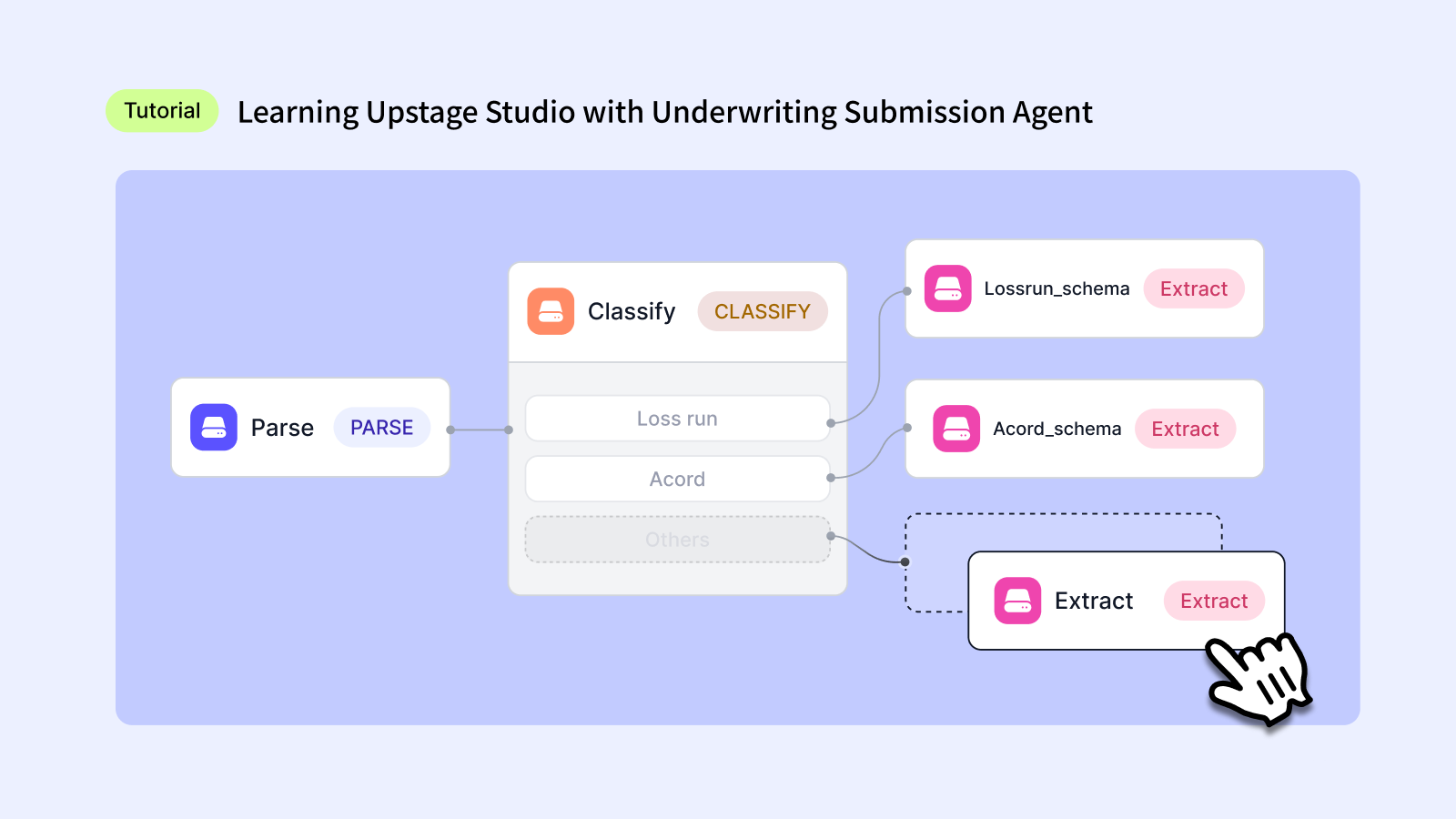
  1. Parse: Fully extracts structure and text from all documents
  2. Classify: Automatically categorizes each document as either ACORD forms or Loss Runs
  3. Extract: Extracts data based on customized schemas for each classified document type

Custom Schema Mapping:
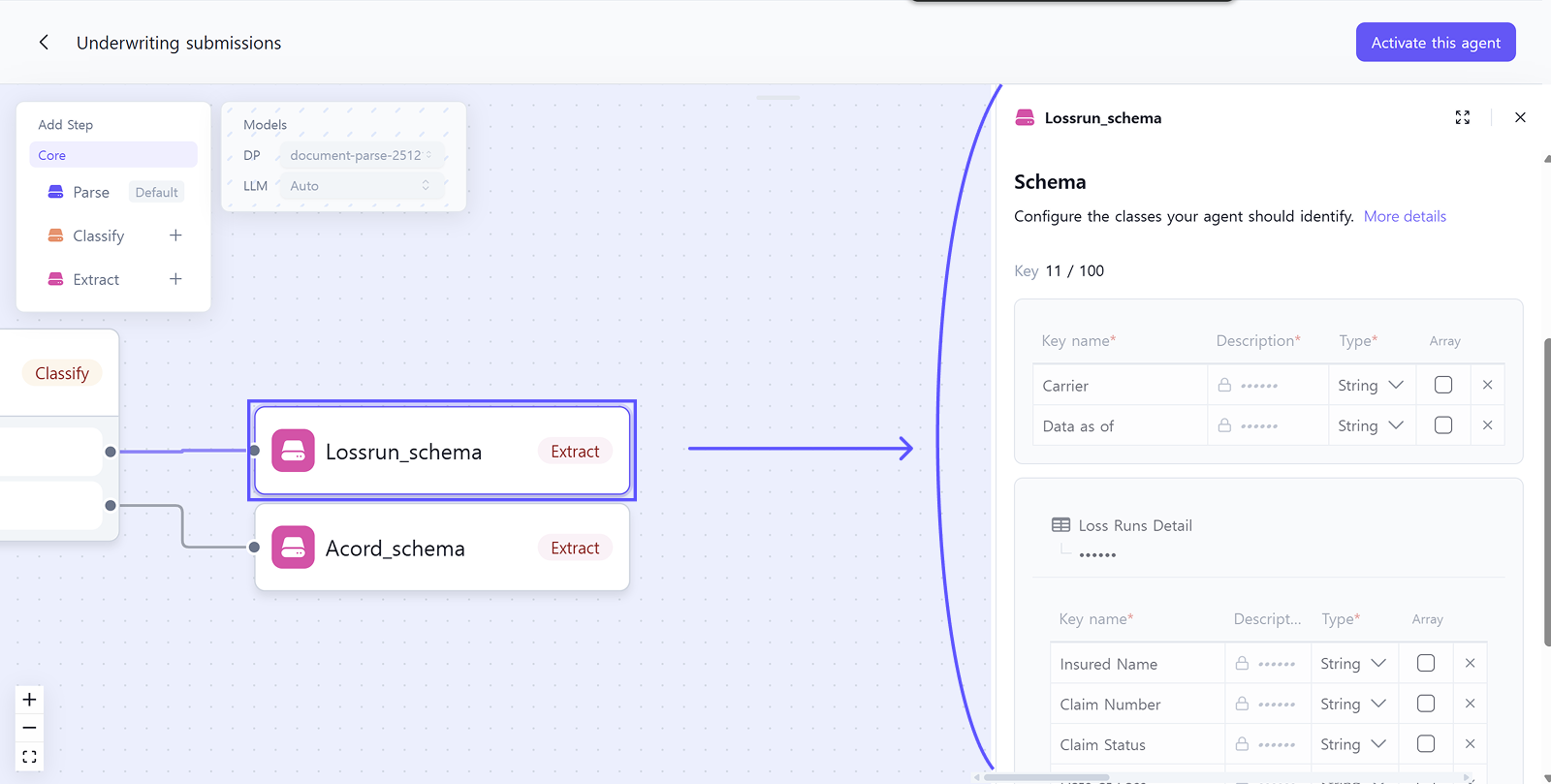
  • ACORD documents → Applied Acordschema: Extracts agency information, applicant details, business lines, policy information, and contact details
  • Loss Run documents → Applied Lossrunschema: Extracts carrier name, report date, policy details, and loss runs detail table with all claims data
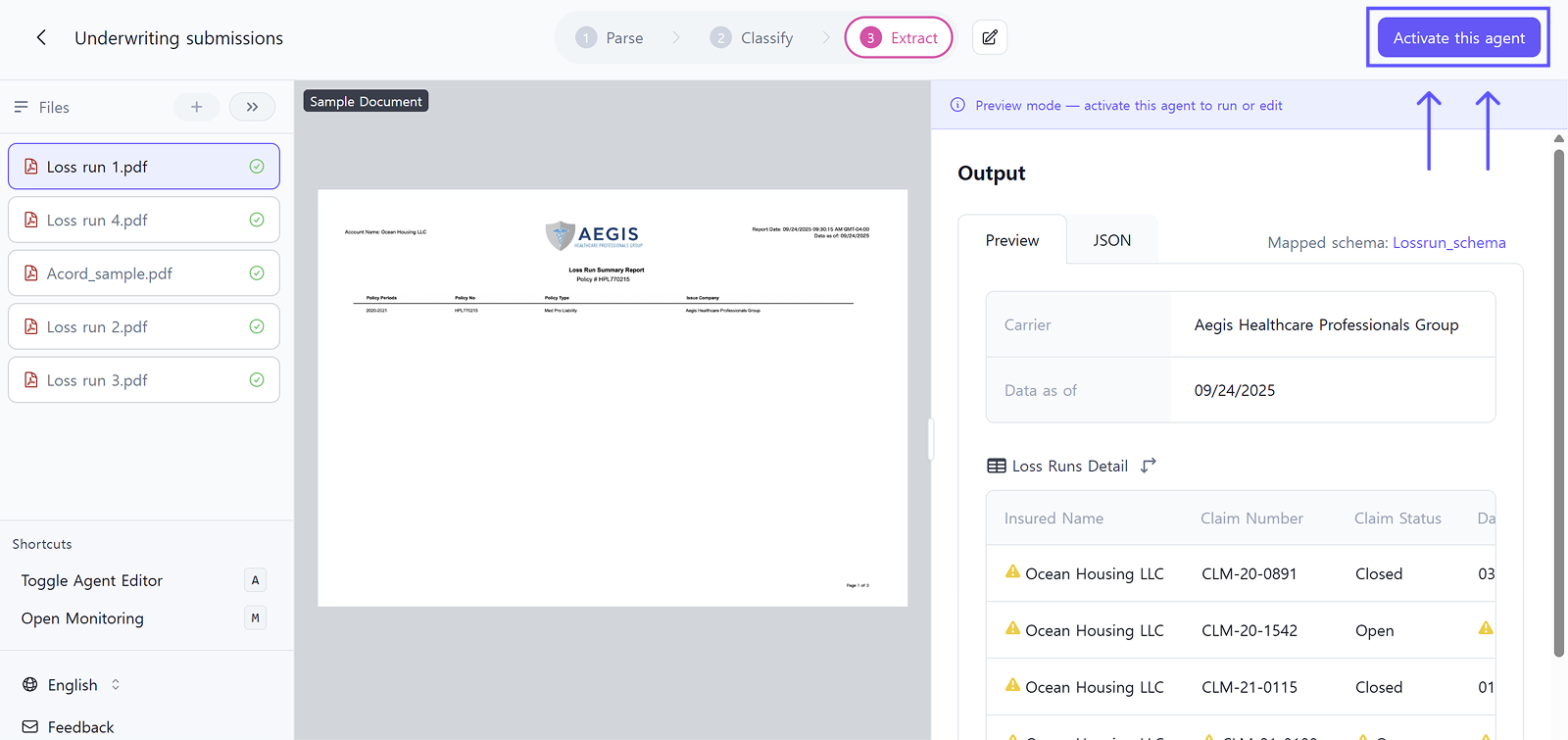
Want to customize? Click 'Activate this agent' in the top right to modify workflows, schema fields, and extraction logic. This allows you to freely configure workflows, modify schema fields, and adjust extraction logic.

Excellent Document Recognition Accuracy

Perfect Processing Even for Poor Quality Scans
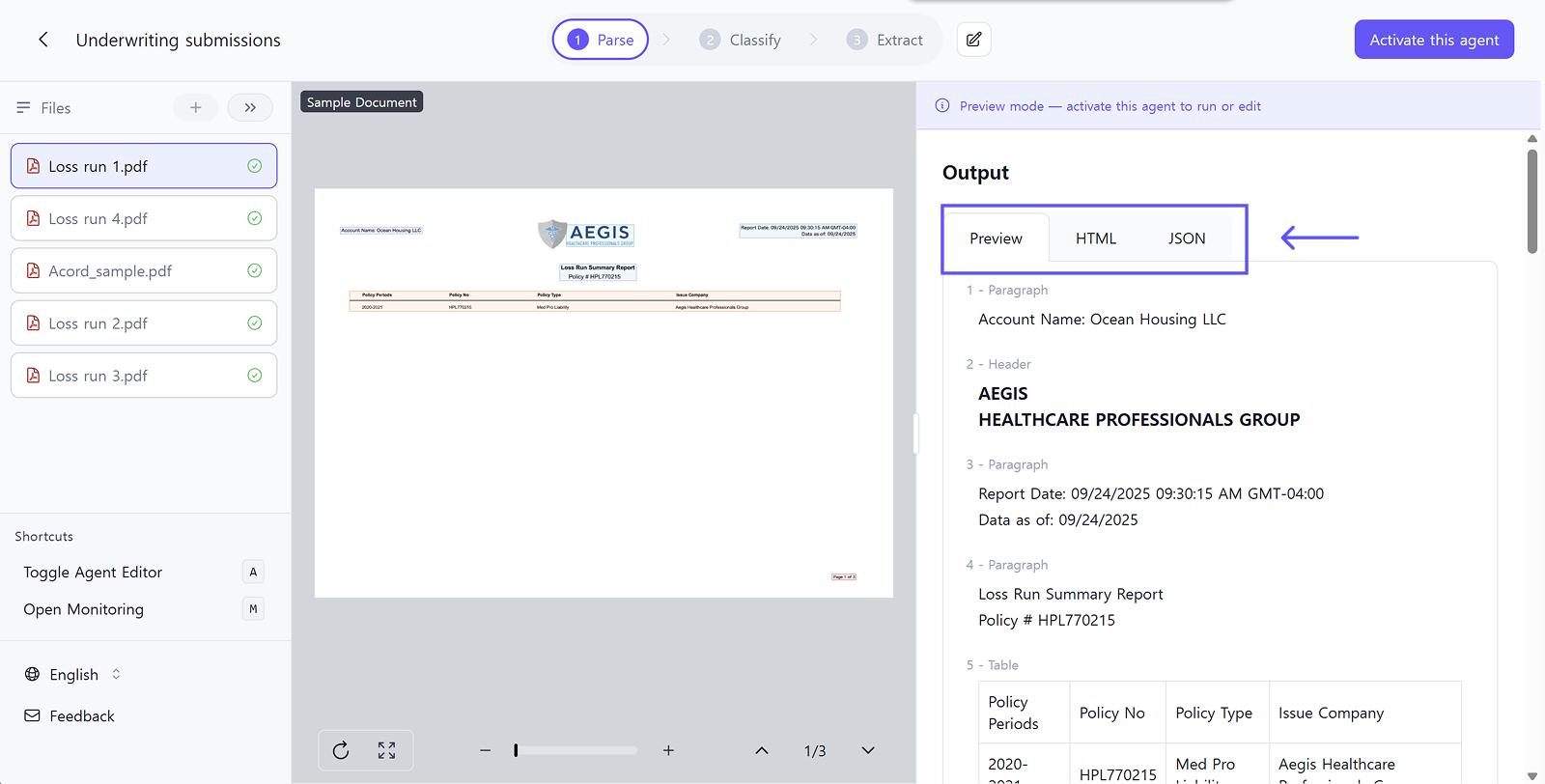
Even if Loss Run documents are blurry from fax transmission, crumpled paper scans, or low-quality copies, Upstage's Document Parse technology maintains high recognition accuracy. Enhanced mode can handle documents with handwritten corrections or severely damaged layouts.

Parse results are available in three formats: Preview, HTML, and JSON. You can review document structure in whichever format you prefer.

Standardizing Various Formats to Single Key Values

Loss Run reports use different field names across insurance carriers. They output various names like 'Incurred Amount', 'Total Incurred', 'Loss Amount', 'Claim Amount', but Upstage's Information Extract standardizes these to a common key value 'Incurred' through schema mapping.

Similarly, contact information in ACORD forms comes in various formats but is structured into a standardized contact_information array. This enables you to:

  • Easily sum total claim amounts across multiple Loss Runs
  • Automatically verify duplicate claim entries
  • Integrate all contact information into CRM systems in a consistent format

Extraction Results and System Integration

Example extracted data:

{
 "Carrier": "Aurora Casualty & Indemnity Company",
 "Data as of": "9/24/2025",
 "Loss Runs Detail": [
   {
     "Incurred": 125000,
     "Claim Number": "2022-IN-01 542",
     "Claim Status": "Open",
     "Date of Loss": "05/15/2022",
     "Insured Name": "OCEAN HOUSING LLC",
     "Description of Loss": "Resident fall with hip fracture"
   }
   ...
 ]
}

The agent extracts structured data from each document type. ACORD forms provide agency details, applicant information, and policy data. Loss Runs provide carrier information and claims tables. Data is standardized across all carrier formats.

Ready to use your data? Export in your preferred format:

  • JSON: Complete extraction results with classification metadata, perfect for API integration
  • CSV: Flat table format for Excel or legacy system imports
  • API: Deploy this workflow as an endpoint and integrate directly with your existing systems

Transform Your Underwriting Processing Workflow

From 15-20 minutes of manual work down to under 3 minutes with automatic processing:

  • Faster processing: Manual sorting and data entry eliminated
  • Structured output: Unstructured documents converted to clean JSON
  • Accurate classification: Automatic document type identification
  • Direct integration: Connect to existing systems via API

Start Automating

Upload your submission package and review results in Studio, then scale to API for production.

👉 Start in Upstage Studio - No API key needed, Start your automation today!

👉 API Documentation - Scale to production with API integration
Learning Upstage Studio with Underwriting Submission Agent

Underwriters waste 15-20 minutes per submission manually sorting mixed documents like ACORD forms and Loss Runs. Upstage Studio automates the entire process—Parse, Classify, Extract—delivering structured, system-ready data in under 3 minutes.

Mirae Lee
Mirae Lee
Tutorials
February 13, 2026
Learning Upstage Studio with Underwriting Submission Agent
We build intelligence for the future of work—now it’s your turn.

Start building with our API or talk to our team.

Share

Every day, underwriters find their desks loaded with submission packages that each contain 10, 20+ mixed documents. Such as ACORD forms, Loss Run reports, questionnaires, and other supporting materials. In fact, before underwriters can really start reviewing, they have to spend 15, 20 minutes per submission sorting the files by hand, figuring out what document each one is, and pulling out the most important information. It's not a question of complicated business logic.

The real problem is the very unstructured nature of the documents where policyholder information, claim histories, and contact details are all mixed up and presented in different formats by different carriers.

Traditional OCR only reads text from images. But underwriting automation requires more: Understanding document structure (Parse) → Classifying document types (Classify) → Extracting and structuring the necessary information (Extract).

Upstage Studio automates this entire process. Upload your submission package and get documents automatically classified with structured data extracted—ready for your underwriting system in under 3 minutes.

👉 Get Started in Upstage Studio

No Schema Engineering Required

One key benefit of Upstage Studio: you don't need to design schemas. Optimized schemas for underwriting submissions are already built in, so you can start processing documents immediately.

How the agent works:

When users upload ACORD forms and various Loss Run documents together, the agent automatically:

  1. Parse: Fully extracts structure and text from all documents
  2. Classify: Automatically categorizes each document as either ACORD forms or Loss Runs
  3. Extract: Extracts data based on customized schemas for each classified document type

Custom Schema Mapping:

  • ACORD documents → Applied Acordschema: Extracts agency information, applicant details, business lines, policy information, and contact details
  • Loss Run documents → Applied Lossrunschema: Extracts carrier name, report date, policy details, and loss runs detail table with all claims data

Want to customize? Click 'Activate this agent' in the top right to modify workflows, schema fields, and extraction logic. This allows you to freely configure workflows, modify schema fields, and adjust extraction logic.

Excellent Document Recognition Accuracy

Perfect Processing Even for Poor Quality Scans

Even if Loss Run documents are blurry from fax transmission, crumpled paper scans, or low-quality copies, Upstage's Document Parse technology maintains high recognition accuracy. Enhanced mode can handle documents with handwritten corrections or severely damaged layouts.

Parse results are available in three formats: Preview, HTML, and JSON. You can review document structure in whichever format you prefer.

Standardizing Various Formats to Single Key Values

Loss Run reports use different field names across insurance carriers. They output various names like 'Incurred Amount', 'Total Incurred', 'Loss Amount', 'Claim Amount', but Upstage's Information Extract standardizes these to a common key value 'Incurred' through schema mapping.

Similarly, contact information in ACORD forms comes in various formats but is structured into a standardized contact_information array. This enables you to:

  • Easily sum total claim amounts across multiple Loss Runs
  • Automatically verify duplicate claim entries
  • Integrate all contact information into CRM systems in a consistent format

Extraction Results and System Integration

Example extracted data:

{
 "Carrier": "Aurora Casualty & Indemnity Company",
 "Data as of": "9/24/2025",
 "Loss Runs Detail": [
   {
     "Incurred": 125000,
     "Claim Number": "2022-IN-01 542",
     "Claim Status": "Open",
     "Date of Loss": "05/15/2022",
     "Insured Name": "OCEAN HOUSING LLC",
     "Description of Loss": "Resident fall with hip fracture"
   }
   ...
 ]
}

The agent extracts structured data from each document type. ACORD forms provide agency details, applicant information, and policy data. Loss Runs provide carrier information and claims tables. Data is standardized across all carrier formats.

Ready to use your data? Export in your preferred format:

  • JSON: Complete extraction results with classification metadata, perfect for API integration
  • CSV: Flat table format for Excel or legacy system imports
  • API: Deploy this workflow as an endpoint and integrate directly with your existing systems

Transform Your Underwriting Processing Workflow

From 15-20 minutes of manual work down to under 3 minutes with automatic processing:

  • Faster processing: Manual sorting and data entry eliminated
  • Structured output: Unstructured documents converted to clean JSON
  • Accurate classification: Automatic document type identification
  • Direct integration: Connect to existing systems via API

Start Automating

Upload your submission package and review results in Studio, then scale to API for production.

👉 Start in Upstage Studio - No API key needed, Start your automation today!

👉 API Documentation - Scale to production with API integration

Every day, underwriters find their desks loaded with submission packages that each contain 10, 20+ mixed documents. Such as ACORD forms, Loss Run reports, questionnaires, and other supporting materials. In fact, before underwriters can really start reviewing, they have to spend 15, 20 minutes per submission sorting the files by hand, figuring out what document each one is, and pulling out the most important information. It's not a question of complicated business logic.

The real problem is the very unstructured nature of the documents where policyholder information, claim histories, and contact details are all mixed up and presented in different formats by different carriers.

Traditional OCR only reads text from images. But underwriting automation requires more: Understanding document structure (Parse) → Classifying document types (Classify) → Extracting and structuring the necessary information (Extract).

Upstage Studio automates this entire process. Upload your submission package and get documents automatically classified with structured data extracted—ready for your underwriting system in under 3 minutes.

👉 Get Started in Upstage Studio

No Schema Engineering Required

One key benefit of Upstage Studio: you don't need to design schemas. Optimized schemas for underwriting submissions are already built in, so you can start processing documents immediately.

How the agent works:

When users upload ACORD forms and various Loss Run documents together, the agent automatically:

  1. Parse: Fully extracts structure and text from all documents
  2. Classify: Automatically categorizes each document as either ACORD forms or Loss Runs
  3. Extract: Extracts data based on customized schemas for each classified document type

Custom Schema Mapping:

  • ACORD documents → Applied Acordschema: Extracts agency information, applicant details, business lines, policy information, and contact details
  • Loss Run documents → Applied Lossrunschema: Extracts carrier name, report date, policy details, and loss runs detail table with all claims data

Want to customize? Click 'Activate this agent' in the top right to modify workflows, schema fields, and extraction logic. This allows you to freely configure workflows, modify schema fields, and adjust extraction logic.

Excellent Document Recognition Accuracy

Perfect Processing Even for Poor Quality Scans

Even if Loss Run documents are blurry from fax transmission, crumpled paper scans, or low-quality copies, Upstage's Document Parse technology maintains high recognition accuracy. Enhanced mode can handle documents with handwritten corrections or severely damaged layouts.

Parse results are available in three formats: Preview, HTML, and JSON. You can review document structure in whichever format you prefer.

Standardizing Various Formats to Single Key Values

Loss Run reports use different field names across insurance carriers. They output various names like 'Incurred Amount', 'Total Incurred', 'Loss Amount', 'Claim Amount', but Upstage's Information Extract standardizes these to a common key value 'Incurred' through schema mapping.

Similarly, contact information in ACORD forms comes in various formats but is structured into a standardized contact_information array. This enables you to:

  • Easily sum total claim amounts across multiple Loss Runs
  • Automatically verify duplicate claim entries
  • Integrate all contact information into CRM systems in a consistent format

Extraction Results and System Integration

Example extracted data:

{
 "Carrier": "Aurora Casualty & Indemnity Company",
 "Data as of": "9/24/2025",
 "Loss Runs Detail": [
   {
     "Incurred": 125000,
     "Claim Number": "2022-IN-01 542",
     "Claim Status": "Open",
     "Date of Loss": "05/15/2022",
     "Insured Name": "OCEAN HOUSING LLC",
     "Description of Loss": "Resident fall with hip fracture"
   }
   ...
 ]
}

The agent extracts structured data from each document type. ACORD forms provide agency details, applicant information, and policy data. Loss Runs provide carrier information and claims tables. Data is standardized across all carrier formats.

Ready to use your data? Export in your preferred format:

  • JSON: Complete extraction results with classification metadata, perfect for API integration
  • CSV: Flat table format for Excel or legacy system imports
  • API: Deploy this workflow as an endpoint and integrate directly with your existing systems

Transform Your Underwriting Processing Workflow

From 15-20 minutes of manual work down to under 3 minutes with automatic processing:

  • Faster processing: Manual sorting and data entry eliminated
  • Structured output: Unstructured documents converted to clean JSON
  • Accurate classification: Automatic document type identification
  • Direct integration: Connect to existing systems via API

Start Automating

Upload your submission package and review results in Studio, then scale to API for production.

👉 Start in Upstage Studio - No API key needed, Start your automation today!

👉 API Documentation - Scale to production with API integration

The 90-Day path to
Underwriting Reinvention

See how Fortune 500 companies eliminate the bottleneck where 70% of submissions arrive incomplete.
1,000+
Submissions Analyzed
90
Days to Transform

Download the White Paper

Thank you! Your submission has been received!
Oops! Something went wrong while submitting the form.

See how AI works on your documents.

Turn documents and data into reliable decisions your team can trust.