New

New

Logistics teams waste hours daily processing invoices from multiple carriers—sorting Fedex, UPS, DHL formats, verifying line items, and manual data entry. Upstage Studio automates the entire workflow through Parse, Classify, and Extract, converting any carrier invoice into standardized, system-ready data in seconds.
Highlights

Logistics teams spend hours daily processing invoices from multiple carriers. Sorting Fedex, UPS, and DHL invoices, verifying line items, and entering data into accounting systems consumes entire workdays. Small forwarding teams handle hundreds of invoices across different formats while time-sensitive shipments wait for payment approval.

Upstage Studio automates the entire process. Upload any logistics invoice in any format and receive structured data ready for your systems.

👉 Explore Logistics Automation Agents in Studio

Why Logistics Invoices Are Hard to Automate
Carrier-Specific Formats

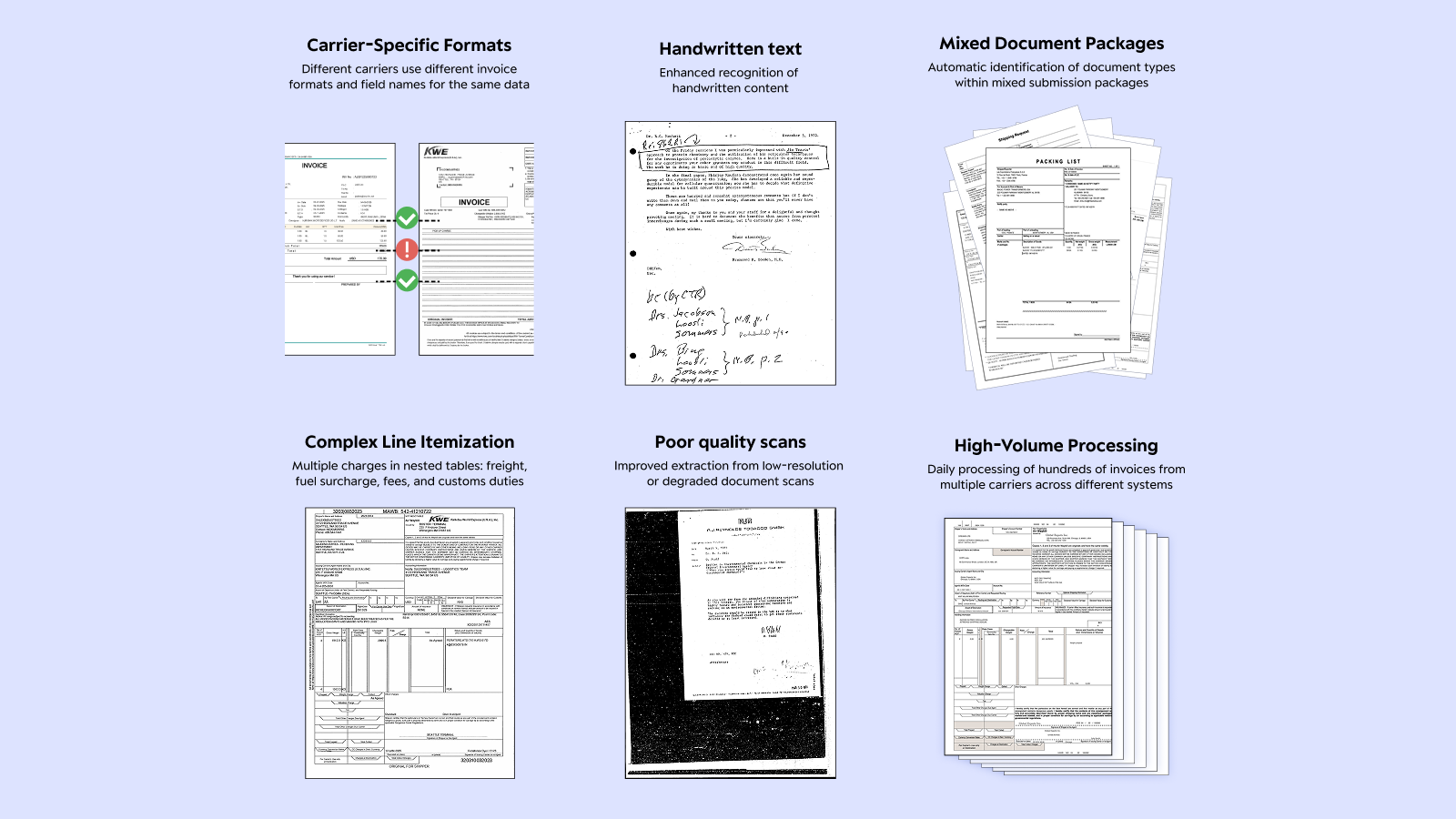
Even the same document type looks completely different across carriers. Logistics invoices from Fedex, UPS, and DHL use different field names, table structures, and layouts. 'Total Charges', 'Amount Due', 'Invoice Total'—these are different names for the same thing, but each carrier employs different terminologies and formats line items differently.

Complex Line Itemization

A single logistics invoice contains base freight charges plus multiple surcharges—fuel surcharges, accessorial fees, customs duties, detention charges, and carrier-specific fees. Each line item must be accurately extracted and categorized, but carriers present this information in different table structures with varying levels of detail.

Poor Scan Quality

Faxed documents, scanned crumpled papers, and photocopied invoices still arrive daily in logistics operations. Invoices forwarded through multiple parties often have degraded quality with blurry text, skewed scans, and broken table lines. Multiple-generation copies make numbers and amounts difficult to verify.

High-Volume Processing

Freight forwarders and 3PL providers process hundreds or thousands of invoices daily from multiple carriers. Small forwarding operations often have limited staff managing large invoice volumes across different systems, creating significant processing bottlenecks and payment delays.

AI Workflow for Logistics Invoice Processing

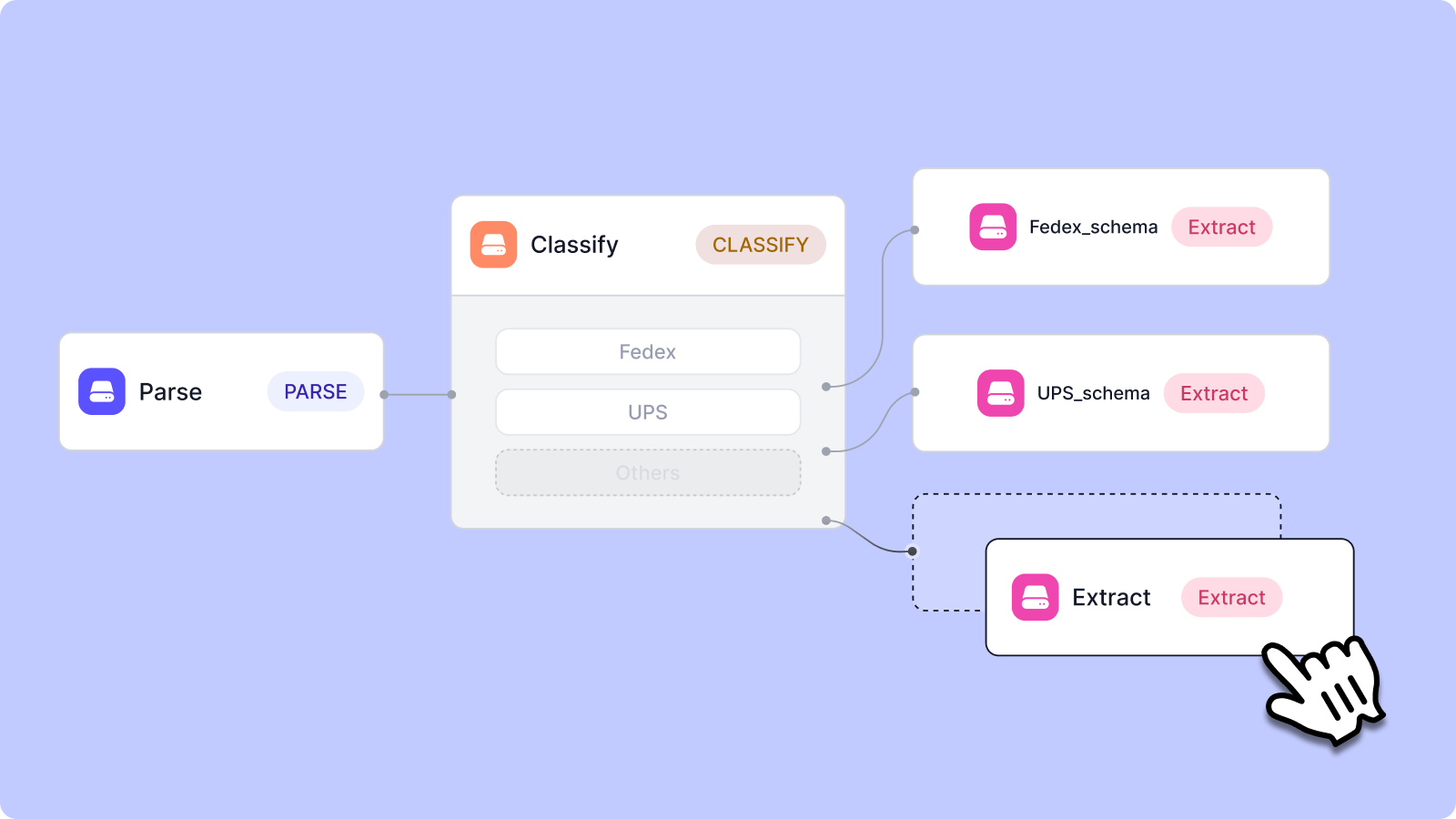
Upstage Studio processes all logistics invoices through a 3-step workflow: Parse → Classify → Extract.
Parse: Extract All Information from Documents
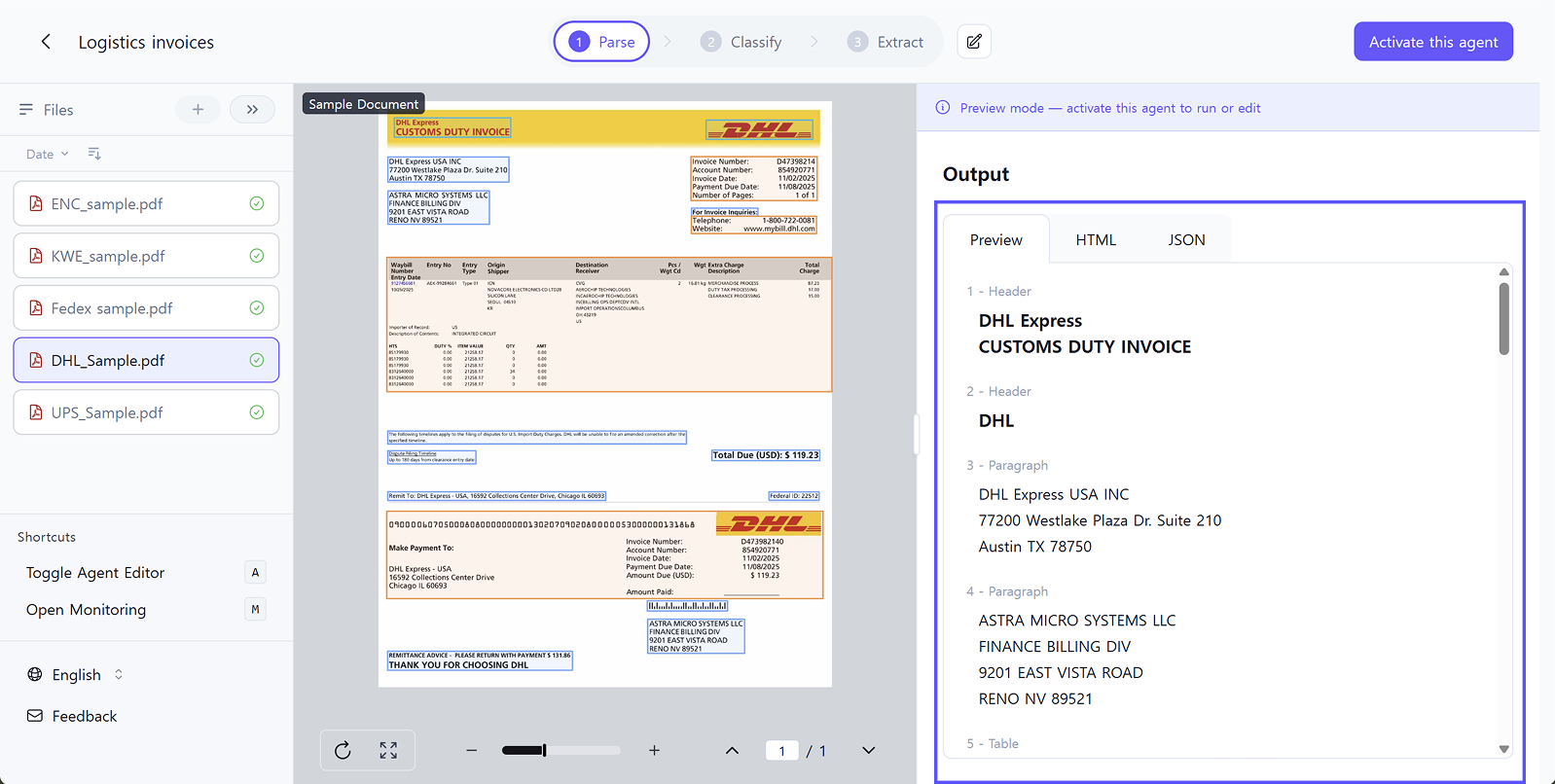
Extract text, tables, and layout structure completely from uploaded invoices.

For logistics invoices:

  • Accurately reads blurry faxed invoices
  • Converts poor-quality scans to structured data
  • Captures complex multi-line item tables intact
  • Extracts all charges, fees, and surcharges without missing data

How it works:

Select the Parse step in Studio and upload your invoices. The system automatically extracts all content regardless of carrier format or document quality.

Classify: Automatically Sort by Carrier
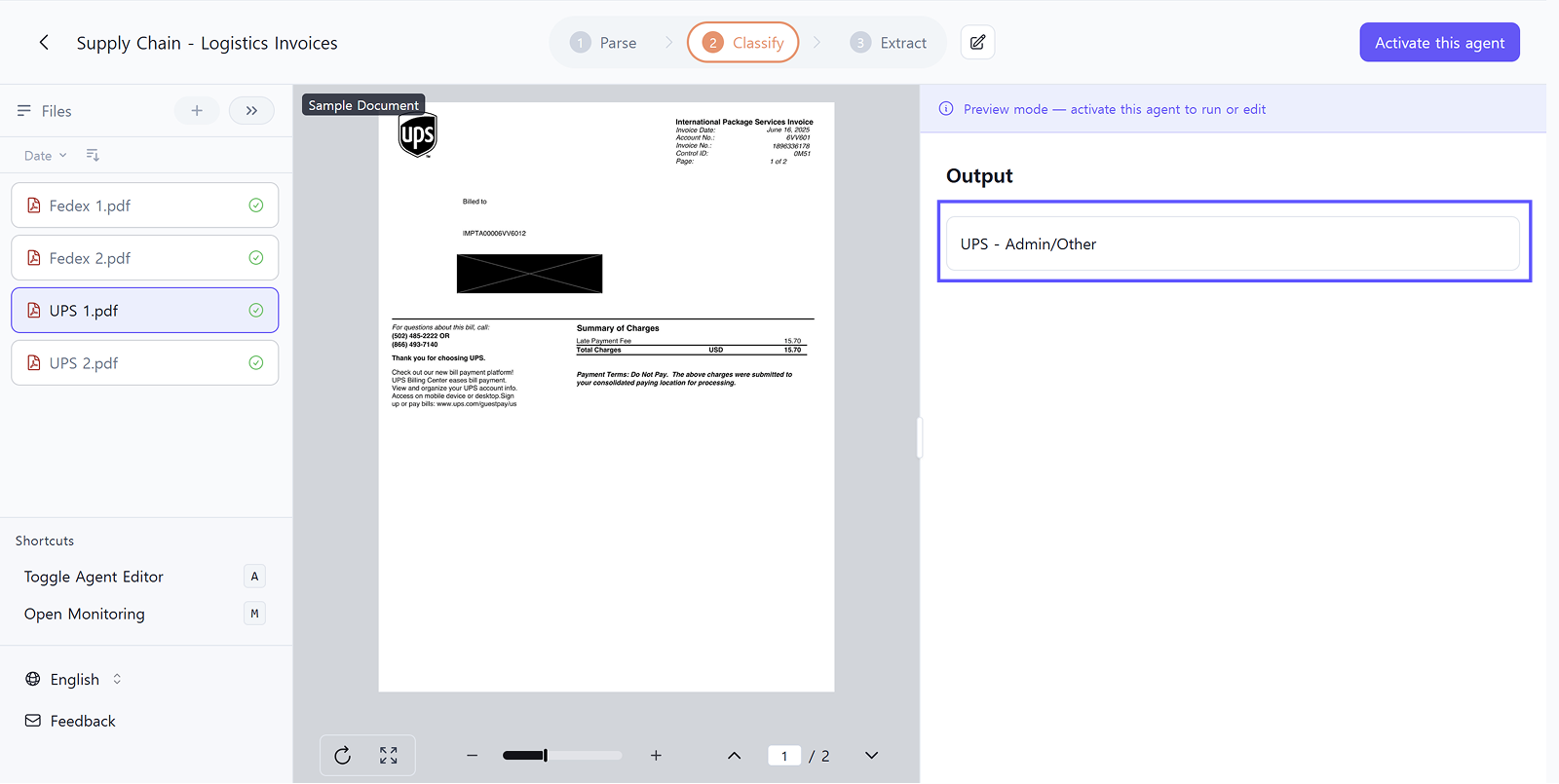
Automatically categorize parsed invoices by carrier or vendor.

For logistics invoices:

  • Mixed invoices from Fedex, UPS, DHL, and other carriers → automatically sorted by vendor
  • Correctly identifies all invoice types even when multiple carriers are mixed together
  • Routes invoices to appropriate processing workflows

How it works:

Define carrier categories in the Classification schema. Create classes like "Fedex" and "UPS" with descriptions of each carrier's characteristics, and AI automatically classifies all uploaded invoices based on these definitions.

Extract: Pull Specific Data by Carrier
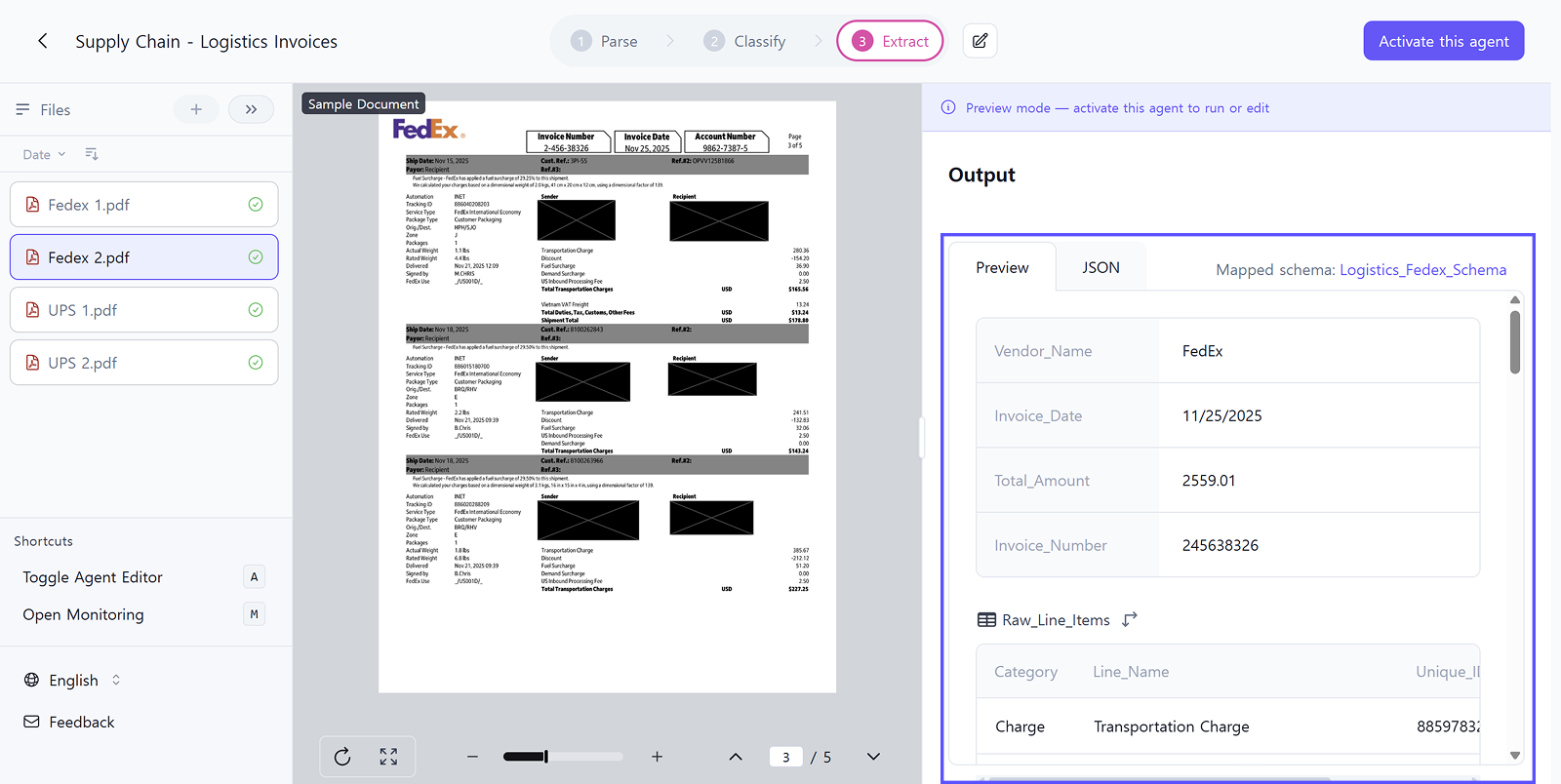
Extract required information from each invoice in structured format.

Schema Mapping:

Apply different extraction schemas for each carrier type while normalizing data into a consistent structure.

  • Fedex invoices → Extract tracking numbers, shipping charges, fuel surcharges, accessorial fees
  • UPS invoices → Extract same data fields despite different field names and layout
  • DHL invoices → Standardize all charges into consistent categories

Standardization:

Unify different field names across carriers into single keys. 'Total Charges', 'Amount Due', 'Invoice Total' → all standardized to 'total_amount', converting any carrier's invoice into the same JSON structure for seamless accounting system integration.

Enterprise Features for High-Volume Processing

The 3-step workflow above is sufficient for individual users or small-volume processing. However, companies processing large volumes via API need additional quality control and monitoring capabilities.
Validate

Review extracted data in table view for quick verification and correction. For high-volume processing, spot-check samples to ensure accuracy. Corrections feed back into the system to improve future processing.

Monitor

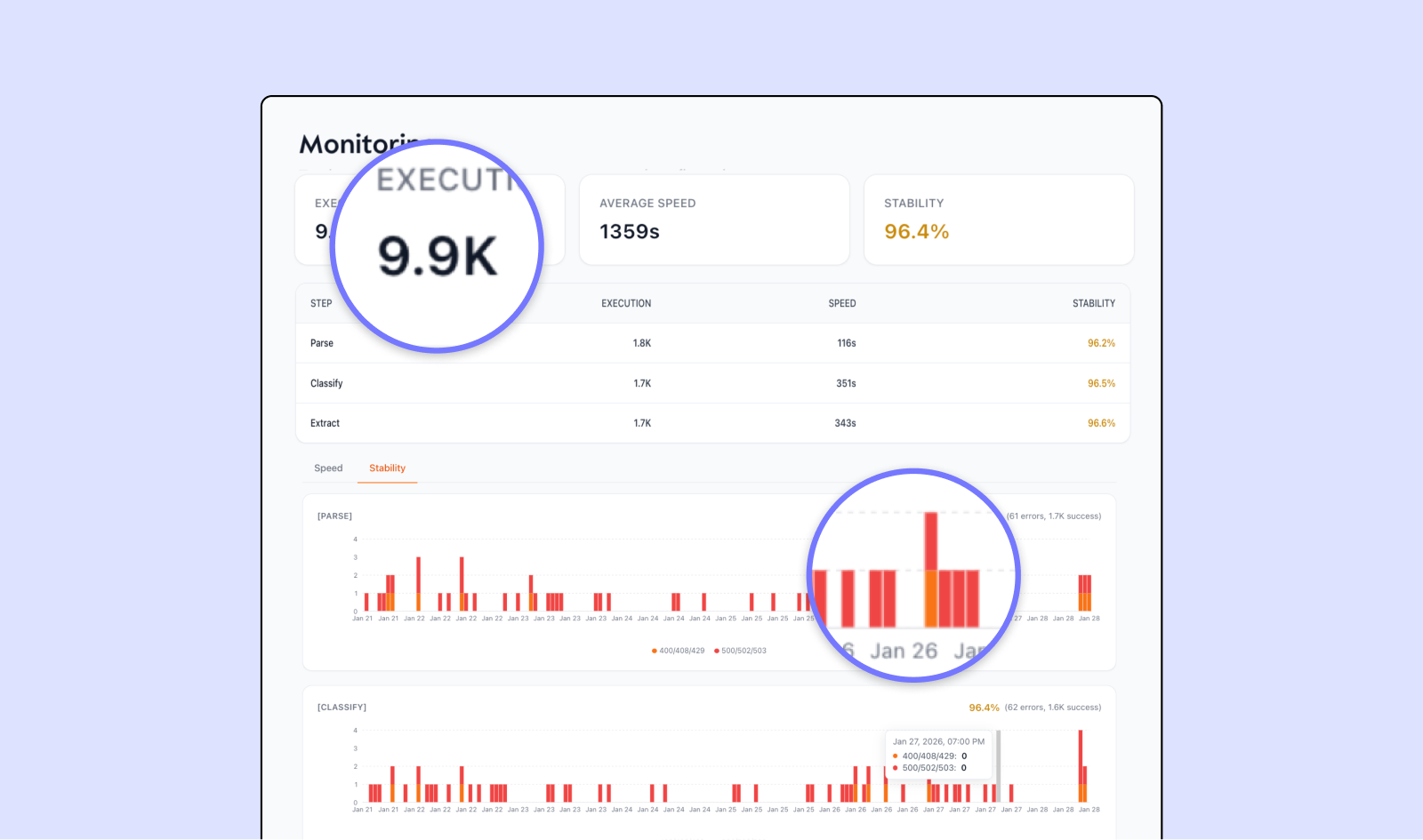
Track processing speed, success rates, and accuracy across thousands of invoices. Monitor average processing time, error rates by carrier, and throughput to identify bottlenecks.

API Deployment

Deploy workflows as API endpoints to integrate with existing accounting, ERP, or freight management systems. Export data in JSON or CSV format for seamless system integration.

Results: From Unstructured to Structured

Aspect Manual Processing AI Automation
Carrier Identification Manually review and sort by carrier Auto-classified by vendor
Data Entry Locate fields across different formats and manually type Automatic extraction and standardization
Line Item Processing Copy charges and fees to spreadsheet Complete itemization auto-extracted
Time Required Minutes to hours per invoice Seconds per invoice
Accuracy Prone to data entry errors Consistent extraction accuracy
Output Manually entered data System-ready JSON/CSV

Real-World Use Cases

Freight Forwarders

Process invoices from multiple carriers automatically. Eliminate manual sorting and data entry while standardizing all carrier data into consistent formats for accounting systems. Small teams can handle significantly higher invoice volumes without additional headcount.

3PL Providers

Automate invoice processing across hundreds of carrier relationships. Extract all charges and fees accurately, converting them into formats ready for immediate system entry. Reduce processing time and eliminate data entry errors.

Logistics Teams

Integrate invoice automation with existing freight management and accounting systems. Automatically classify invoices by carrier, extract all line items, and export data in formats compatible with ERP systems. Free up staff to focus on exception handling and vendor relationship management.

Ready-to-Use Logistics Automation Agents

Activate any agent in Studio to start processing invoices immediately.

👉 API Documentation - Scale to production with API integration
Logistics Document Automation with Upstage Studio

Logistics teams waste hours daily processing invoices from multiple carriers—sorting Fedex, UPS, DHL formats, verifying line items, and manual data entry. Upstage Studio automates the entire workflow through Parse, Classify, and Extract, converting any carrier invoice into standardized, system-ready data in seconds.

Mirae Lee
Mirae Lee
February 19, 2026
Logistics Document Automation with Upstage Studio
We build intelligence for the future of work—now it’s your turn.

Start building with our API or talk to our team.

Share

Logistics teams spend hours daily processing invoices from multiple carriers. Sorting Fedex, UPS, and DHL invoices, verifying line items, and entering data into accounting systems consumes entire workdays. Small forwarding teams handle hundreds of invoices across different formats while time-sensitive shipments wait for payment approval.

Upstage Studio automates the entire process. Upload any logistics invoice in any format and receive structured data ready for your systems.

👉 Explore Logistics Automation Agents in Studio

Why Logistics Invoices Are Hard to Automate

Carrier-Specific Formats

Even the same document type looks completely different across carriers. Logistics invoices from Fedex, UPS, and DHL use different field names, table structures, and layouts. 'Total Charges', 'Amount Due', 'Invoice Total'—these are different names for the same thing, but each carrier employs different terminologies and formats line items differently.

Complex Line Itemization

A single logistics invoice contains base freight charges plus multiple surcharges—fuel surcharges, accessorial fees, customs duties, detention charges, and carrier-specific fees. Each line item must be accurately extracted and categorized, but carriers present this information in different table structures with varying levels of detail.

Poor Scan Quality

Faxed documents, scanned crumpled papers, and photocopied invoices still arrive daily in logistics operations. Invoices forwarded through multiple parties often have degraded quality with blurry text, skewed scans, and broken table lines. Multiple-generation copies make numbers and amounts difficult to verify.

High-Volume Processing

Freight forwarders and 3PL providers process hundreds or thousands of invoices daily from multiple carriers. Small forwarding operations often have limited staff managing large invoice volumes across different systems, creating significant processing bottlenecks and payment delays.

AI Workflow for Logistics Invoice Processing

Upstage Studio processes all logistics invoices through a 3-step workflow: Parse → Classify → Extract.

Parse: Extract All Information from Documents

Extract text, tables, and layout structure completely from uploaded invoices.

For logistics invoices:

  • Accurately reads blurry faxed invoices
  • Converts poor-quality scans to structured data
  • Captures complex multi-line item tables intact
  • Extracts all charges, fees, and surcharges without missing data

How it works:

Select the Parse step in Studio and upload your invoices. The system automatically extracts all content regardless of carrier format or document quality.

Classify: Automatically Sort by Carrier

Automatically categorize parsed invoices by carrier or vendor.

For logistics invoices:

  • Mixed invoices from Fedex, UPS, DHL, and other carriers → automatically sorted by vendor
  • Correctly identifies all invoice types even when multiple carriers are mixed together
  • Routes invoices to appropriate processing workflows

How it works:

Define carrier categories in the Classification schema. Create classes like "Fedex" and "UPS" with descriptions of each carrier's characteristics, and AI automatically classifies all uploaded invoices based on these definitions.

Extract: Pull Specific Data by Carrier

Extract required information from each invoice in structured format.

Schema Mapping:

Apply different extraction schemas for each carrier type while normalizing data into a consistent structure.

  • Fedex invoices → Extract tracking numbers, shipping charges, fuel surcharges, accessorial fees
  • UPS invoices → Extract same data fields despite different field names and layout
  • DHL invoices → Standardize all charges into consistent categories

Standardization:

Unify different field names across carriers into single keys. 'Total Charges', 'Amount Due', 'Invoice Total' → all standardized to 'total_amount', converting any carrier's invoice into the same JSON structure for seamless accounting system integration.

Enterprise Features for High-Volume Processing

The 3-step workflow above is sufficient for individual users or small-volume processing. However, companies processing large volumes via API need additional quality control and monitoring capabilities.

Validate

Review extracted data in table view for quick verification and correction. For high-volume processing, spot-check samples to ensure accuracy. Corrections feed back into the system to improve future processing.

Monitor

Track processing speed, success rates, and accuracy across thousands of invoices. Monitor average processing time, error rates by carrier, and throughput to identify bottlenecks.

API Deployment

Deploy workflows as API endpoints to integrate with existing accounting, ERP, or freight management systems. Export data in JSON or CSV format for seamless system integration.

Results: From Unstructured to Structured

Aspect Manual Processing AI Automation
Carrier Identification Manually review and sort by carrier Auto-classified by vendor
Data Entry Locate fields across different formats and manually type Automatic extraction and standardization
Line Item Processing Copy charges and fees to spreadsheet Complete itemization auto-extracted
Time Required Minutes to hours per invoice Seconds per invoice
Accuracy Prone to data entry errors Consistent extraction accuracy
Output Manually entered data System-ready JSON/CSV

Real-World Use Cases

Freight Forwarders

Process invoices from multiple carriers automatically. Eliminate manual sorting and data entry while standardizing all carrier data into consistent formats for accounting systems. Small teams can handle significantly higher invoice volumes without additional headcount.

3PL Providers

Automate invoice processing across hundreds of carrier relationships. Extract all charges and fees accurately, converting them into formats ready for immediate system entry. Reduce processing time and eliminate data entry errors.

Logistics Teams

Integrate invoice automation with existing freight management and accounting systems. Automatically classify invoices by carrier, extract all line items, and export data in formats compatible with ERP systems. Free up staff to focus on exception handling and vendor relationship management.

Ready-to-Use Logistics Automation Agents

Activate any agent in Studio to start processing invoices immediately.

👉 API Documentation - Scale to production with API integration

Logistics teams spend hours daily processing invoices from multiple carriers. Sorting Fedex, UPS, and DHL invoices, verifying line items, and entering data into accounting systems consumes entire workdays. Small forwarding teams handle hundreds of invoices across different formats while time-sensitive shipments wait for payment approval.

Upstage Studio automates the entire process. Upload any logistics invoice in any format and receive structured data ready for your systems.

👉 Explore Logistics Automation Agents in Studio

Why Logistics Invoices Are Hard to Automate

Carrier-Specific Formats

Even the same document type looks completely different across carriers. Logistics invoices from Fedex, UPS, and DHL use different field names, table structures, and layouts. 'Total Charges', 'Amount Due', 'Invoice Total'—these are different names for the same thing, but each carrier employs different terminologies and formats line items differently.

Complex Line Itemization

A single logistics invoice contains base freight charges plus multiple surcharges—fuel surcharges, accessorial fees, customs duties, detention charges, and carrier-specific fees. Each line item must be accurately extracted and categorized, but carriers present this information in different table structures with varying levels of detail.

Poor Scan Quality

Faxed documents, scanned crumpled papers, and photocopied invoices still arrive daily in logistics operations. Invoices forwarded through multiple parties often have degraded quality with blurry text, skewed scans, and broken table lines. Multiple-generation copies make numbers and amounts difficult to verify.

High-Volume Processing

Freight forwarders and 3PL providers process hundreds or thousands of invoices daily from multiple carriers. Small forwarding operations often have limited staff managing large invoice volumes across different systems, creating significant processing bottlenecks and payment delays.

AI Workflow for Logistics Invoice Processing

Upstage Studio processes all logistics invoices through a 3-step workflow: Parse → Classify → Extract.

Parse: Extract All Information from Documents

Extract text, tables, and layout structure completely from uploaded invoices.

For logistics invoices:

  • Accurately reads blurry faxed invoices
  • Converts poor-quality scans to structured data
  • Captures complex multi-line item tables intact
  • Extracts all charges, fees, and surcharges without missing data

How it works:

Select the Parse step in Studio and upload your invoices. The system automatically extracts all content regardless of carrier format or document quality.

Classify: Automatically Sort by Carrier

Automatically categorize parsed invoices by carrier or vendor.

For logistics invoices:

  • Mixed invoices from Fedex, UPS, DHL, and other carriers → automatically sorted by vendor
  • Correctly identifies all invoice types even when multiple carriers are mixed together
  • Routes invoices to appropriate processing workflows

How it works:

Define carrier categories in the Classification schema. Create classes like "Fedex" and "UPS" with descriptions of each carrier's characteristics, and AI automatically classifies all uploaded invoices based on these definitions.

Extract: Pull Specific Data by Carrier

Extract required information from each invoice in structured format.

Schema Mapping:

Apply different extraction schemas for each carrier type while normalizing data into a consistent structure.

  • Fedex invoices → Extract tracking numbers, shipping charges, fuel surcharges, accessorial fees
  • UPS invoices → Extract same data fields despite different field names and layout
  • DHL invoices → Standardize all charges into consistent categories

Standardization:

Unify different field names across carriers into single keys. 'Total Charges', 'Amount Due', 'Invoice Total' → all standardized to 'total_amount', converting any carrier's invoice into the same JSON structure for seamless accounting system integration.

Enterprise Features for High-Volume Processing

The 3-step workflow above is sufficient for individual users or small-volume processing. However, companies processing large volumes via API need additional quality control and monitoring capabilities.

Validate

Review extracted data in table view for quick verification and correction. For high-volume processing, spot-check samples to ensure accuracy. Corrections feed back into the system to improve future processing.

Monitor

Track processing speed, success rates, and accuracy across thousands of invoices. Monitor average processing time, error rates by carrier, and throughput to identify bottlenecks.

API Deployment

Deploy workflows as API endpoints to integrate with existing accounting, ERP, or freight management systems. Export data in JSON or CSV format for seamless system integration.

Results: From Unstructured to Structured

Aspect Manual Processing AI Automation
Carrier Identification Manually review and sort by carrier Auto-classified by vendor
Data Entry Locate fields across different formats and manually type Automatic extraction and standardization
Line Item Processing Copy charges and fees to spreadsheet Complete itemization auto-extracted
Time Required Minutes to hours per invoice Seconds per invoice
Accuracy Prone to data entry errors Consistent extraction accuracy
Output Manually entered data System-ready JSON/CSV

Real-World Use Cases

Freight Forwarders

Process invoices from multiple carriers automatically. Eliminate manual sorting and data entry while standardizing all carrier data into consistent formats for accounting systems. Small teams can handle significantly higher invoice volumes without additional headcount.

3PL Providers

Automate invoice processing across hundreds of carrier relationships. Extract all charges and fees accurately, converting them into formats ready for immediate system entry. Reduce processing time and eliminate data entry errors.

Logistics Teams

Integrate invoice automation with existing freight management and accounting systems. Automatically classify invoices by carrier, extract all line items, and export data in formats compatible with ERP systems. Free up staff to focus on exception handling and vendor relationship management.

Ready-to-Use Logistics Automation Agents

Activate any agent in Studio to start processing invoices immediately.

👉 API Documentation - Scale to production with API integration

The 90-Day path to
Underwriting Reinvention

See how Fortune 500 companies eliminate the bottleneck where 70% of submissions arrive incomplete.
1,000+
Submissions Analyzed
90
Days to Transform

Download the White Paper

Thank you! Your submission has been received!
Oops! Something went wrong while submitting the form.

See how AI works on your documents.

Turn documents and data into reliable decisions your team can trust.