


Insurance teams waste hours daily on manual document work—sorting submissions, entering Loss Run data, validating ACORD forms. Upstage Studio automates the entire workflow through Parse, Classify, and Extract, turning any insurance document into system-ready structured data in under 3 minutes.
Insurance teams spend a significant amount of time daily doing manual work with documents. They spend whole workdays doing Loss Run data entry, ACORD form validation, and sorting of underwriting submissions. While you're organizing that 50-page broker package, complex cases that need real underwriting attention get pushed aside.
Upstage Studio takes the entire process through automation. You can upload any insurance document of any format and receive structured data that is ready for your systems.
👉 Explore Insurance Automation Agents in Studio
Why Insurance Documents Are Hard to Automate
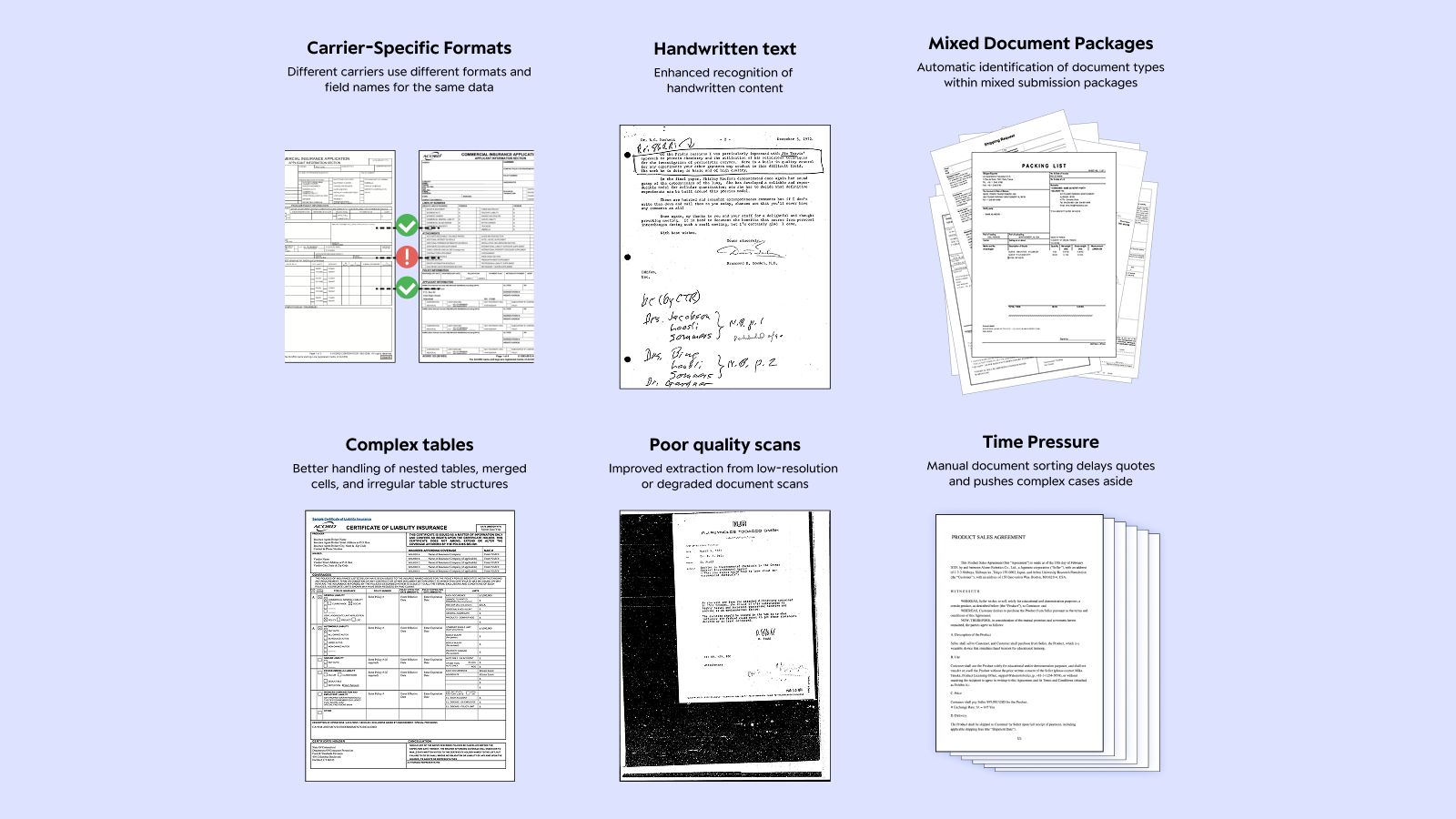
Carrier-Specific Formats
Even the same document type looks completely different across carriers. Loss Run reports from Aurora, Aegis, and Travelers use different field names, table structures, and layouts. 'Incurred Amount', 'Total Incurred', 'Loss Amount'these are different names for the same thing, but each carrier employs different terminologies.
Complex Tables
Documents may be loaded with policy information, claim details, and payment history dividing them into numerous nested tables. The layout of tables keeps changing from one page to another. Sometimes the tables may even contain other tables. Conventional OCR simply cannot figure out these complex layouts.
Poor Scan Quality
Faxed documents, scanned wrinkled papers, and handwritten corrections still still arrive daily in insurance operations. ACORD forms, though standardized, often have handwritten entries that make automatic recognition very difficult. Blurry text, skewed scans, and stained backgrounds are common for all document types.
Mixed Document Packages
An underwriting submission is a single 50+ page PDF that usually contains ACORD forms, Loss Runs, questionnaires, and other supporting materials. To automate processing, you first need to identify which page is which document type before applying the right extraction method.
Time Pressure
Brokers want fast quotes. But sorting one submission package and entering data takes 15-20 minutes. Complex cases never get proper review, and profitable risks get missed.
AI Workflow for Insurance Document Processing
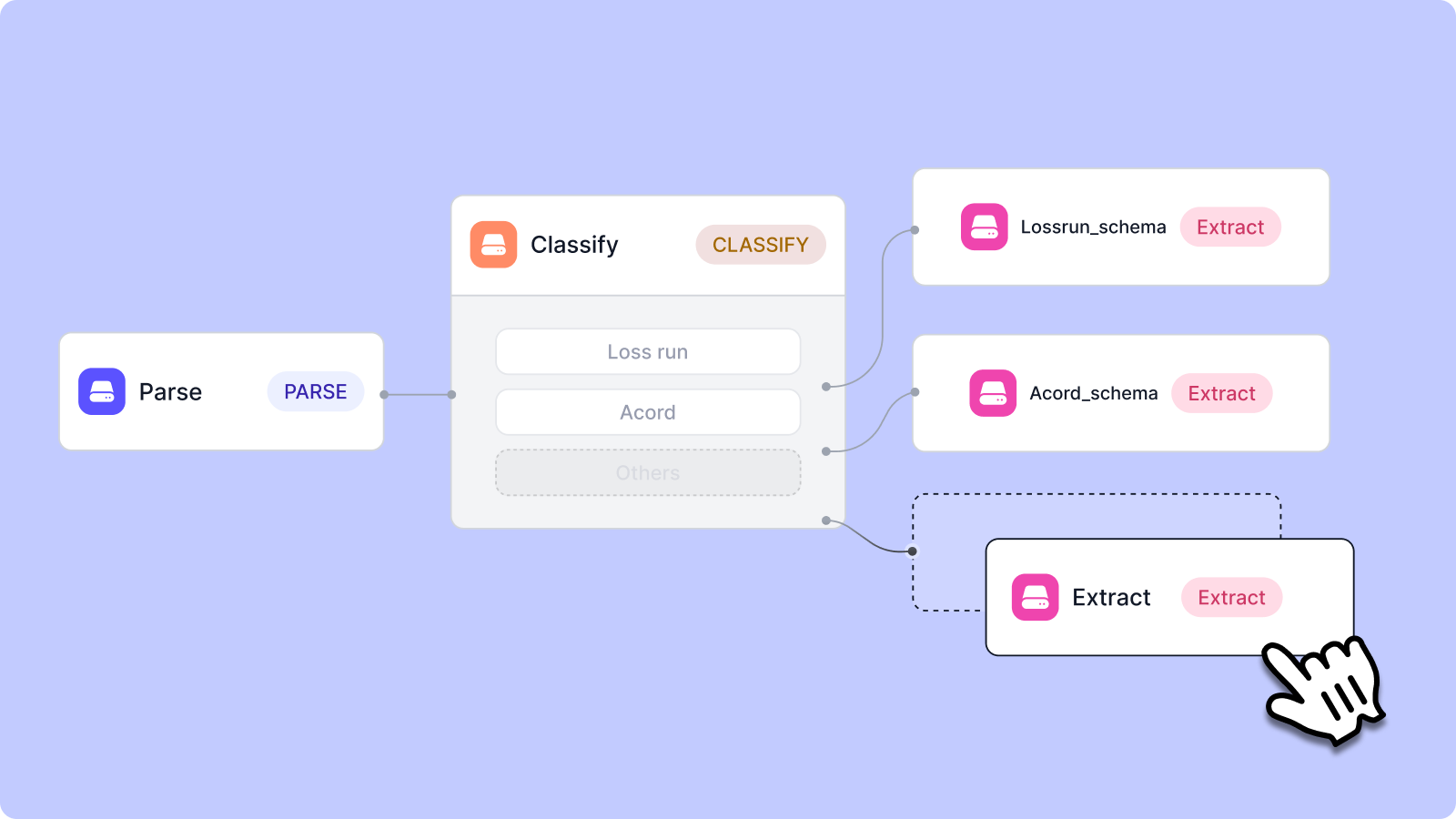
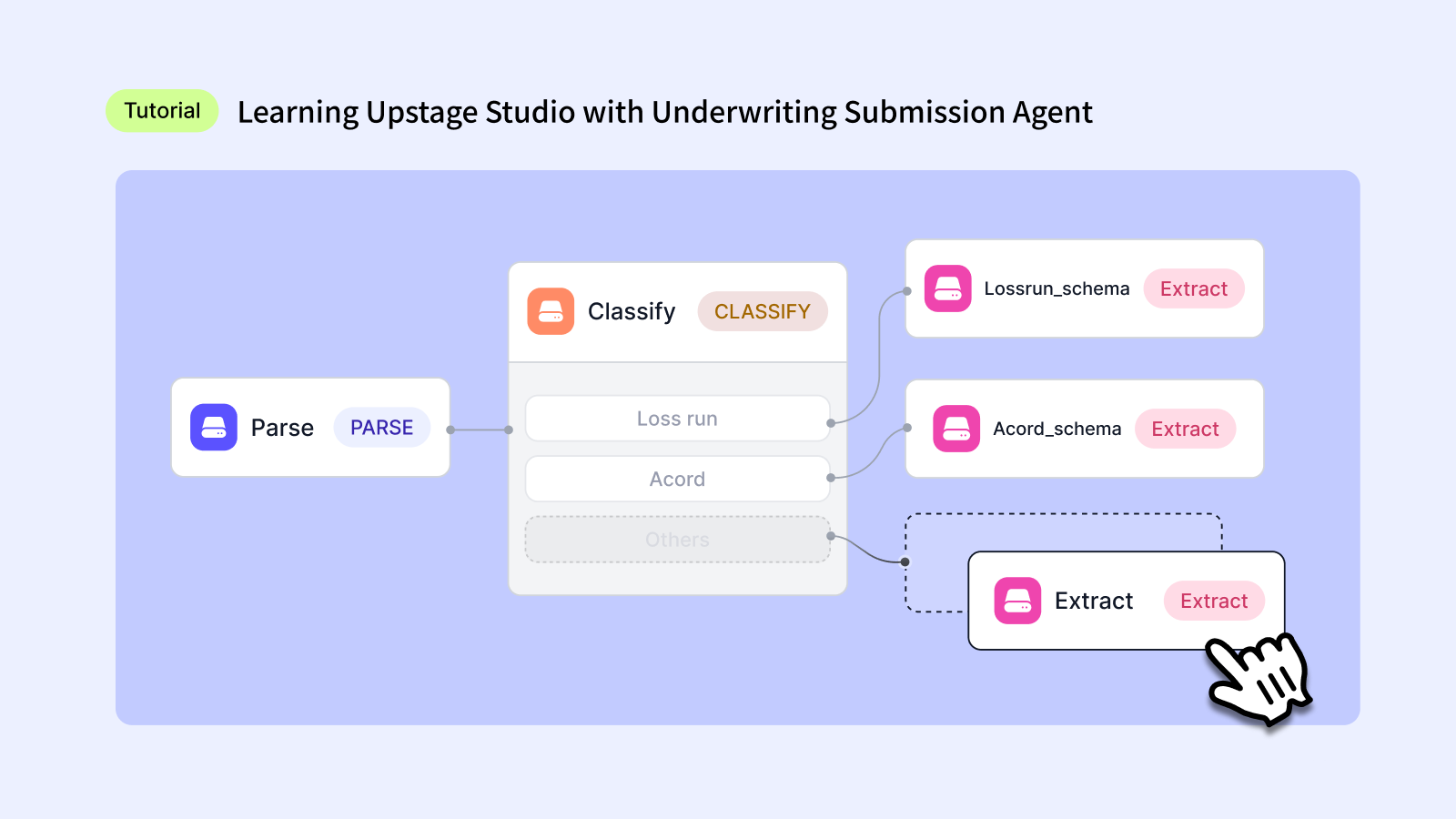
Upstage Studio processes all insurance documents through a 3-step workflow: Parse → Classify → Extract.
Parse: Extract All Information from Documents
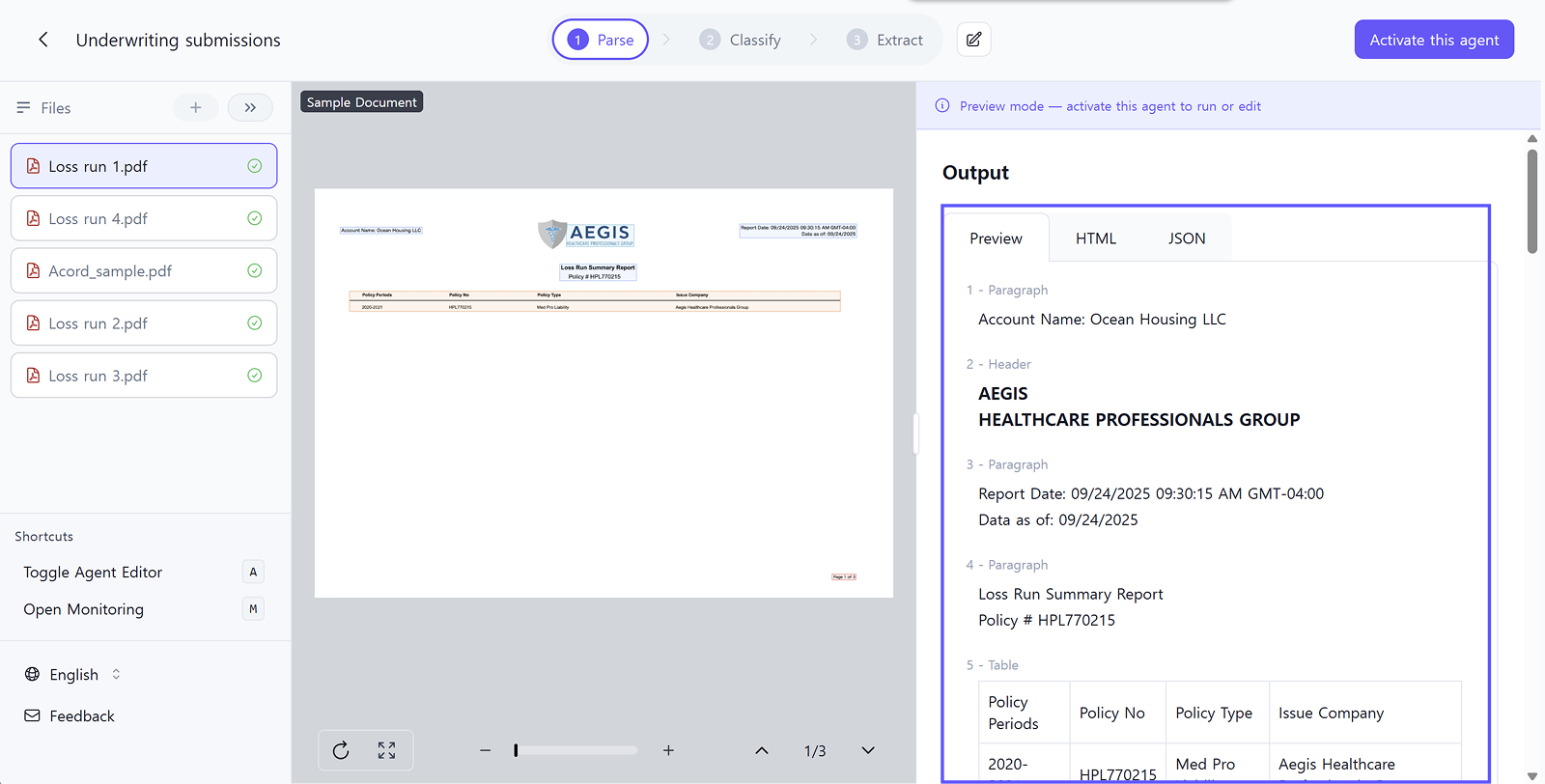
Extract text, tables, and layout structure completely from uploaded documents.
For insurance documents:
- Accurately reads blurry faxed Loss Runs
- Converts handwritten corrections on ACORD forms to text
- Captures complex nested table structures intact
- Extracts multi-page claim history tables without missing data
How it works:
Select the Parse step in Studio and upload your documents. Most insurance documents work with default settings. Enhanced mode is available for severely damaged or extremely low-quality scans.
Classify: Automatically Sort Document Types
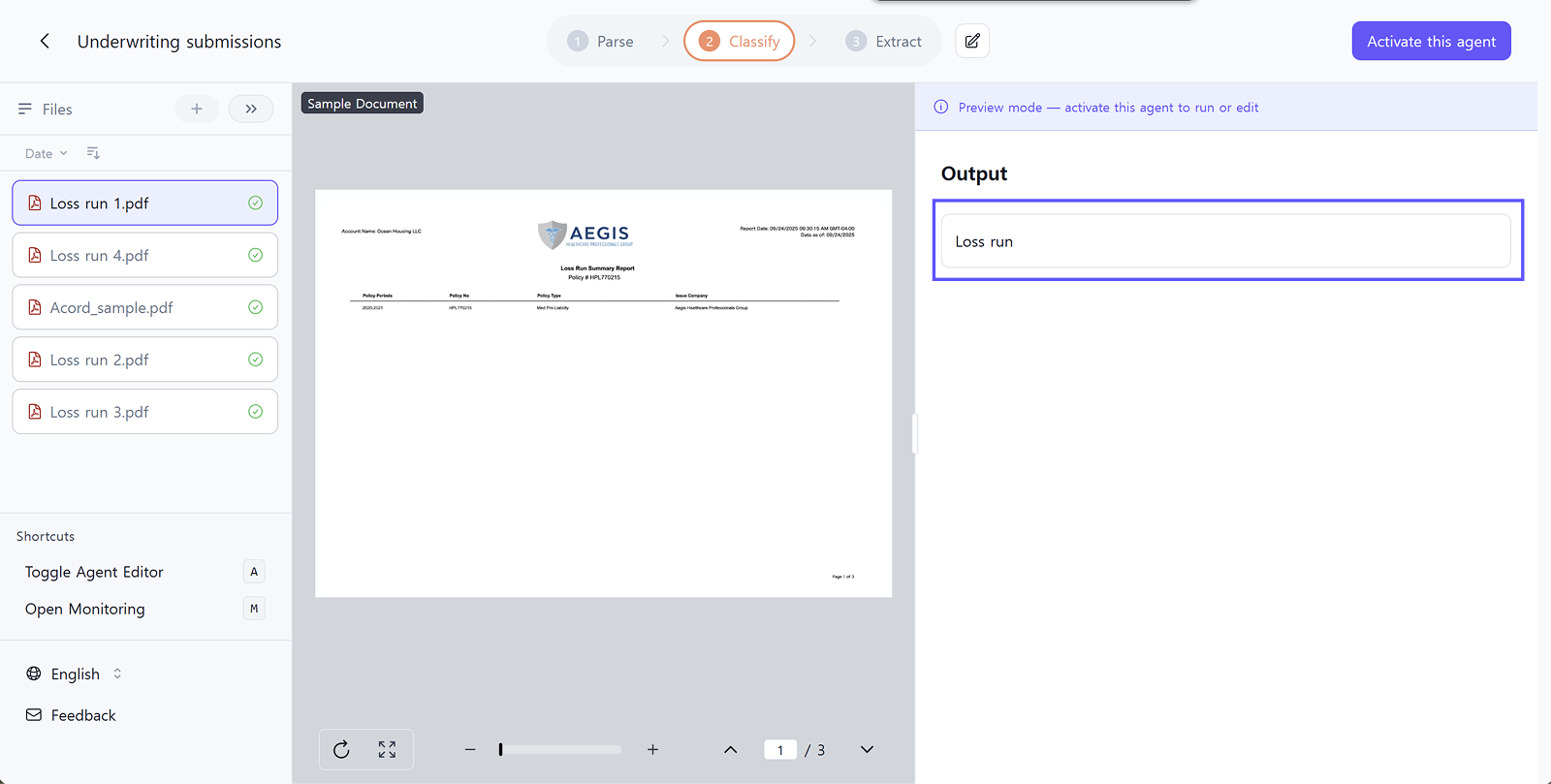
Automatically categorize parsed documents by type.
For insurance documents:
- 50-page mixed broker package → automatically sorted into "5 ACORD forms, 3 Loss Runs, 2 questionnaires"
- Correctly identifies all Loss Runs even when multiple carriers are mixed together
- 95%+ classification accuracy
How it works:
Define document categories in the Classification schema. Create classes like "ACORD" and "Loss Run" with descriptions of each type's characteristics, and AI automatically classifies all uploaded documents based on these definitions.
Extract: Pull Specific Data by Document Type
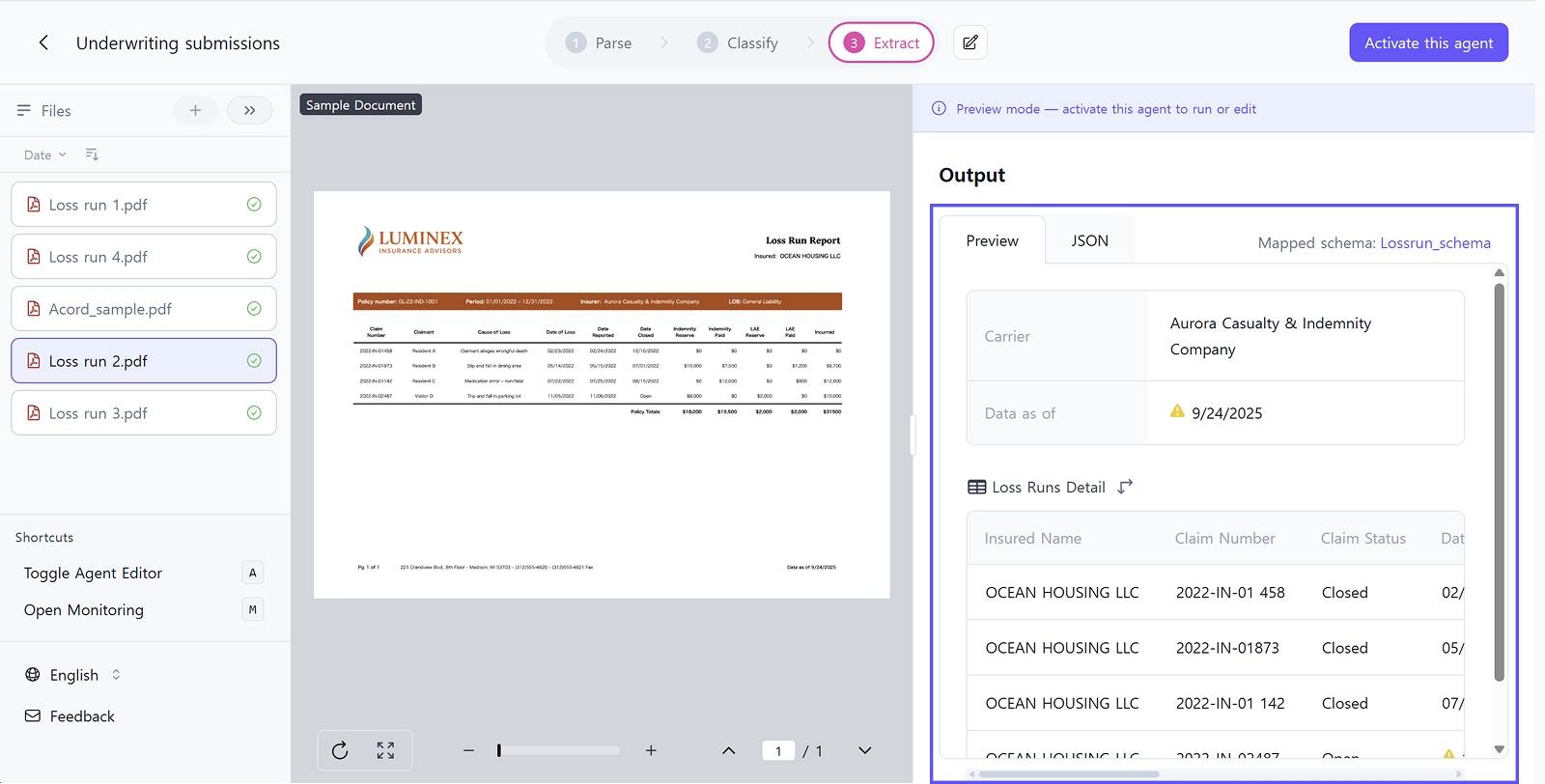
Extract required information from each classified document in structured format.
Schema Mapping - The Key Feature:
Apply different extraction schemas for each document type.
- ACORD forms → Apply
Acordschema - Extract agency information, applicant details, business lines, policy information, contact details
- Loss Runs → Apply
Lossrunschema - Extract carrier name, report date, policy information, complete claim history table
Auto-Generate Schema:
Simply provide instructions like "extract carrier information and complete claim history table," and AI automatically generates the necessary JSON schema. You can also upload your existing schema if you have one.
Standardization:
Unify different field names across carriers into single keys. 'Incurred Amount', 'Total Incurred', 'Loss Amount' → all standardized to 'Incurred', converting any carrier's document into the same JSON structure.
Enterprise Features for High-Volume Processing
The 3-step workflow above is sufficient for individual users or small-volume processing. However, companies processing hundreds or thousands of documents daily via API need additional quality control and monitoring capabilities.
Validate
Review and correct extracted data in real-time using table view. For high-volume processing, quickly verify samples to improve accuracy. When you correct values directly in table view, AI learns from these corrections and provides more accurate results in subsequent processing.
Monitor
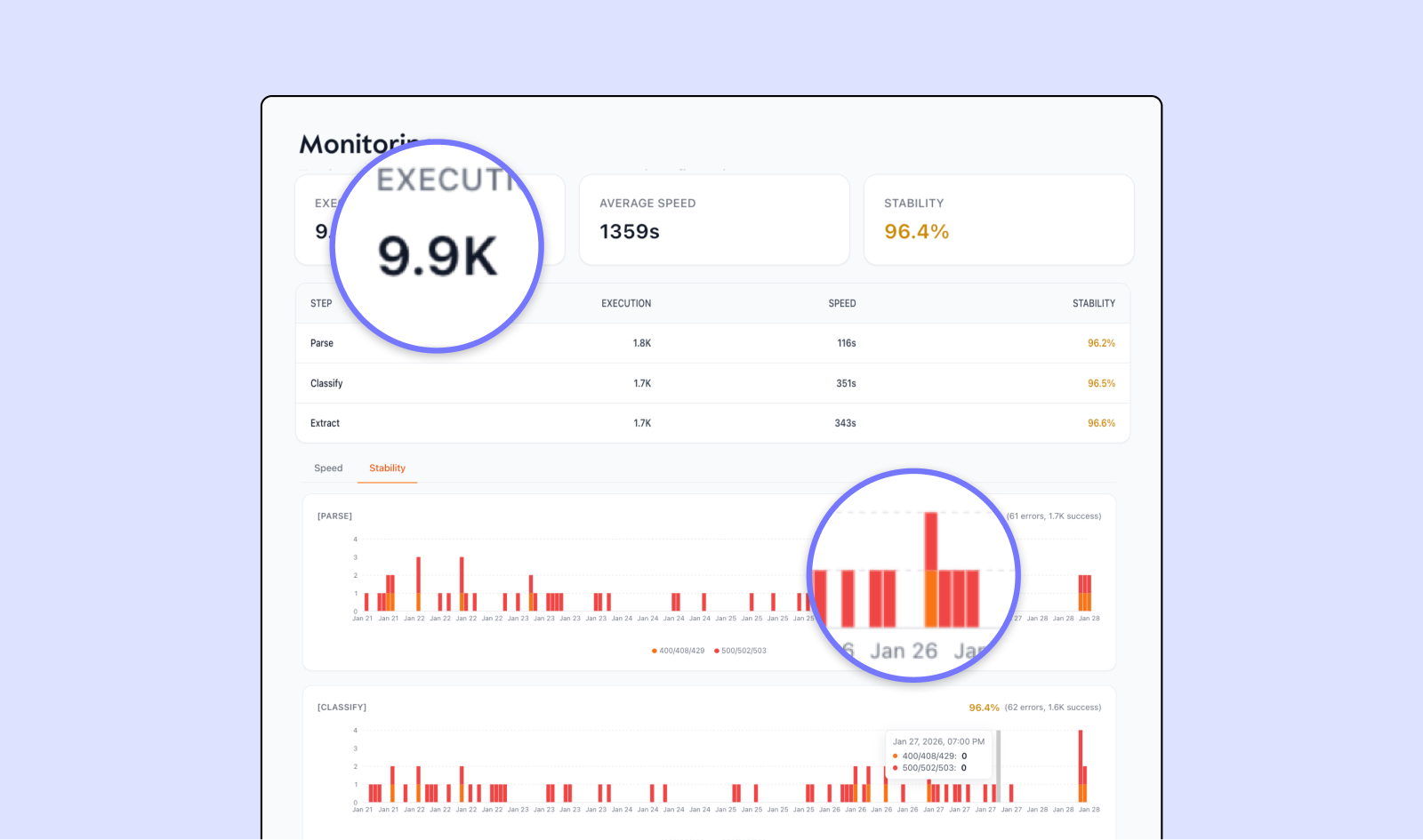
Dashboard for tracking speed, stability, and accuracy when processing thousands of documents via API. For example, when processing 9,900 Loss Runs, monitor average processing time, success rate by step, and error count in real-time.
Deploy your Studio workflow as an API endpoint to integrate with existing underwriting systems or CRM. Export extracted data in JSON or CSV format.
Results: From Unstructured to Structured
Real-World Use Cases
Underwriting Operations
Automatically classify mixed broker submissions and extract necessary information from each document. Underwriters focus on risk analysis instead of data entry. Faster review of complex cases means quicker responses to brokers and more deal opportunities.
Broker Intake
Convert various document formats from multiple brokers into standardized data. Direct data transfer to intake systems without manual entry drastically reduces processing time.
Claims Review
Automatically classify Claims Reports and Police Reports, extracting claim details into structured tables. Reduced processing time and fewer manual entry errors improve overall claims handling quality.
Ready-to-Use Insurance Automation Agents
Activate any agent in Studio to start processing documents immediately.
- Underwriting Submissions — Auto-classify mixed packages and extract data | [Read Guide →]
- Loss Run Reports — Convert carrier-specific formats to standard tables
- Loss Runs - Worker's Comp — Extract workers' compensation claim history
- Declaration Pages — Extract policy contract information
- Auto Police Reports — Extract claim information from accident reports
👉 API Documentation - Scale to production with API integration



_en.avif)
_en.avif)
